
Low effort mobile app enhancements that removed 100% of falsely reported battery alert tickets
The Milwaukee Tools Bluetooth Tracking Tag is a compact, rugged device that helps users locate tools and equipment using Bluetooth connectivity. Designed for jobsite durability, it pairs with a mobile app to show real‑time location data, status alerts, and battery life—making it easier for professionals to keep track of gear and reduce loss or downtime.
Year
2025
Client
Milwaukee Tool
Role
UX Designer
Team
Product Team (Development + Ownership)
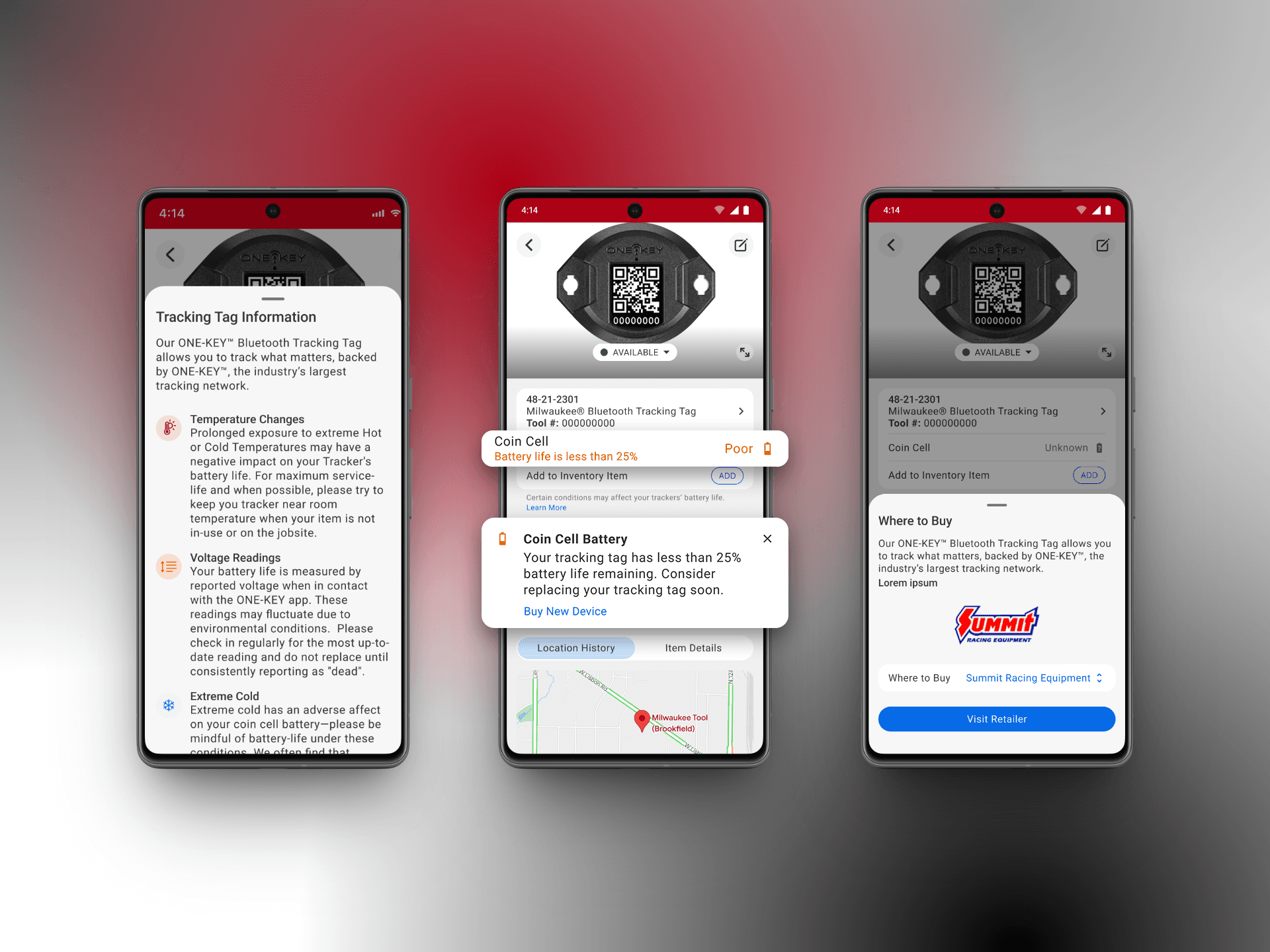
Problem
Too many false alarms made a rugged jobsite tool feel unreliable
When the Milwaukee Tool Bluetooth Tracking Tag shipped, it was tough, small, and paired with a mobile app that helped pros find lost gear. But something weird kept happening: a staggering 35% of devices were triggering “dead battery” flags, even when they weren’t actually dead, flooding support with tickets and wasting field time.
That noise wasn’t just a UX wrinkle. It eroded confidence in the whole product. I needed to make the alerts trustworthy and useful — not white-noise panic buttons.
In partnership with product and engineering, we worked within real constraints: limited firmware interpretation changes, tight timelines, and a strong desire to avoid complexity and tech debt. The focus wasn’t adjusting thresholds to fix data inaccuracy; it was also making our system behavior more understandable to our users.
Process
Instead of slapping on new screens or making louder notifications, I focused on two questions:
Is the system telling users the right thing at the right time?
Do users understand what they can do next with confidence?
I started with the data: the root of most false alarms wasn’t UI design — it was inaccurate battery status thresholds and unclear feedback loops. Fixing that meant reevaluating the logic, interaction patterns, and mental model users had for “battery health.
Solution
Making the "unhappy" path, the "still somewhat happy" path
Using reusable patterns to deliver clear, actionable guidance right when users needed it, quietly did a lot of heavy lifting behind the scenes. In theory, it would mean fewer false service tickets and fewer confused detours if we nailed the right solution.
The best part: we could improve outcomes for users and the business while keeping development effort lean, repeatable, and ready to scale for the growing list of bluetooth-enabled product offerings. 🛠️
A newly added a new path to purchase was created to help users purchase a new device when their only option was device replacement—done so in a way that felt obvious instead of pushy, and aimed at helping the user despite them having to buy a new device (something they're probably not thrilled with).
Together, the timing shift and visual cues turned battery alerts from background noise into a clear, confidence-boosting signal users actually understand and act on—and the new path to purchase feature would get users into a new device and back to tracking their assets, simpler and easier than before.
Impact
No more need to sound the alarm + now we know what to do, too.
By adjusting battery thresholds, adding clear visual cues, new path to purchase, and providing contextual in-app guidance—we completely eliminated false “Dead” and "Dying" alerts for tracking devices & helped users self-serve for device replacements. This improved user experience and lowered unnecessary service costs while making users happier.
Began with
35:100
Units falsely reporting as dead or dying
Ended with
5:100
Units validly reporting dead or dying
False Reports
0
No New Tickets
Results